
Advanced Pomodoro Timer
Focus sessions, breaks, custom durations, tasks, and stats in one clean tool.
Pomodoro Timer
Timer Settings
Add Task
Tasks
Overview
Free Pomodoro Timer
It is really hard to stay focused when you have a lot of things going on around you. You have a list of things to do and you get notifications all the time. It does not matter if you are studying for a test working on a project or just doing your tasks. It is not easy to keep your attention on one thing for a time.
Our Free Pomodoro Timer helps you stay focused by breaking your work into parts. You work for a while and then you take a break. This is a way to manage your time. It helps you feel less tired. You can pay attention better. It also makes big tasks feel less scary.
The Pomodoro Technique is used by students, workers, freelancers, writers, programmers and people who work from home around the world. If you follow a routine where you work and then take a break you can get more done. Not feel so tired.
What Is a Free Pomodoro Timer?
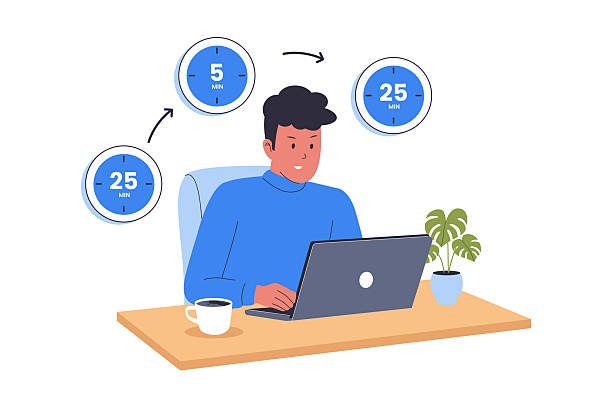
A Free Pomodoro Timer is a tool you can use online. It is based on the Pomodoro Technique, which was made by Francesco Cirillo. This technique says you should work for a while like 25 minutes and then take a 5-minute break.
After you work for a while four times you take a longer break. This break is usually 15 to 30 minutes. Then you start working
This way of working helps you pay attention not get distracted and have energy all day. Of trying to work for hours without stopping you work in small parts. This keeps your mind fresh. You can get more done.
Why Use a Free Pomodoro Timer?
A lot of people have trouble putting things off getting distracted and feeling mentally tired. A Pomodoro Timer gives you a plan to follow. It helps you stay focused and work better.
Using a Free Pomodoro Timer has a lot of points:
You can pay attention better when you are working or studying.
You do not get distracted much.
You do not get as tired because you take breaks.
You get more done during the day.
You can break projects into smaller parts.
You get better at managing your time.
You stay motivated when you are doing tasks.
You have a balance, between work and life.
Whether you are studying, writing, programming, designing or doing office work the Pomodoro Technique can help you finish tasks efficiently.
How the Pomodoro Technique Works
The Pomodoro Technique is easy to follow.
Step 1: Choose a Task
Pick one thing you want to do without getting distracted.
Step 2: Set the Timer
Set the timer for 25 minutes. Only work on the task you chose.
Step 3: Work Without Interruptions
Do not check your phone, emails or social media while you are working.
Step 4: Take a Short Break
When the timer goes off take a 5-minute break before you start working
Step 5: Repeat the Cycle
After you work four times take a break. This break is 15 to 30 minutes. Then you can start working
This routine helps you pay attention and gives your brain time to rest between work sessions.
Why the Pomodoro Technique Is Effective
Working for a time without stopping often makes you less focused and less productive. The Pomodoro Technique says you should work hard for a little while and then take a break.
This balance helps you pay attention not put things off and makes hard tasks feel easier. Over time a lot of people find that they get more work done and feel less stressed and tired.
How to Use the Free Pomodoro Timer
Using the Pomodoro Timer is really easy. You do not need to make an account or put any software on your computer. Just do these steps:
Step 1: Choose a Task
Pick one thing you want to do. This could be studying, writing, coding, reading or any kind of work that needs your attention. The Pomodoro Timer is great for this.
Step 2: Start the Timer
Click the Start button to start working for 25 minutes. During this time only work on the task you chose. The Pomodoro Timer will help you stay on track.
Step 3: Work Without Distractions
Do not check your phone, social media, emails or anything else that might distract you until the timer stops. Staying focused is very important when using the Pomodoro Timer.
Step 4: Take a Short Break
When the timer finishes take a 5-minute break. Get up stretch drink some water or just relax before starting to work with the Pomodoro Timer.
Step 5: Repeat the Process
Do four work sessions with the Pomodoro Timer then take a break of 15 to 30 minutes before starting to work again.
Key Features of Our Free Pomodoro Timer
The Pomodoro Timer is made to help you stay focused and make it easy to use.
Easy to Use
You can start working with one click. You do not need to set anything up or make an account to use the Pomodoro Timer.
Custom Work Sessions
You can change how long you work to fit your needs and what you want to achieve with the Pomodoro Timer.
Short and Long Breaks
Take breaks to rest your mind and stay focused all day with the Pomodoro Timer.
Clean User Interface
The simple design helps you work without distractions, which’s what the Pomodoro Timer is all about.
Works on All Devices
You can use the Pomodoro Timer on your computer, tablet or phone from any web browser.
Completely Free
You can use all the features of the Pomodoro Timer without paying or installing anything.
Benefits of Using a Free Pomodoro Timer
The Pomodoro Timer is very helpful because it makes work feel easier and helps you concentrate.
Improve Focus
Working in sessions with the Pomodoro Timer helps you stay focused on one thing at a time.
Increase Productivity
Breaking work into parts with the Pomodoro Timer makes it easier to get more done.
Reduce Procrastination
Starting a work session with the Pomodoro Timer feels less scary than thinking about working for hours.
Prevent Burnout
Taking breaks with the Pomodoro Timer gives your brain time to rest so you can stay productive.
Better Time Management
Using the Pomodoro Timer helps you see how you spend your time and make your daily routine better.
Build Consistent Work Habits
Using the Pomodoro Timer every day helps you stay disciplined. Creates a good work routine.
Who Can Use the Free Pomodoro Timer?
The Pomodoro Timer is for anyone who wants to improve their focus and productivity.
Students
Students can use the Free Pomodoro Timer when they study, do homework get ready for exams or read books.
Professionals
Professionals can stay focused during meetings, projects, writing reports and daily work with the Free Pomodoro Timer.
Freelancers
Freelancers can organize their work meet deadlines and avoid distractions when working from home with the Free Pomodoro Timer.
Writers and Content Creators
Writers can stay focused when they create articles, blog posts, books and marketing content with the Free Pomodoro Timer.
Developers and Designers
Programmers and designers can work on projects without losing focus with the Free Pomodoro Timer.
Remote Workers
People who work from home can use the Free Pomodoro Timer to create a routine and improve their productivity.
Tips for Getting the Best Results
To get the most out of the Free Pomodoro Timer do these things:
Focus on one task at a time with the Free Pomodoro Timer.
Turn off notifications that’re not necessary.
Keep your workspace clean and organized which helps when using the Free Pomodoro Timer.
Use your breaks to move or stretch with the Free Pomodoro Timer.
Do not skip breaks they are important when using the Free Pomodoro Timer.
Look at what you did at the end of the day with the Free Pomodoro Timer.
Plan your important tasks before you start with the Free Pomodoro Timer.
Common Mistakes to Avoid
Some people do not use the Free Pomodoro Timer correctly which makes it not work well.
Multitasking
Trying to do many things at once with the Free Pomodoro Timer does not work.
Ignoring Breaks
Skipping breaks with the Free Pomodoro Timer is bad for you. Makes you less productive.
Constant Interruptions
Checking messages or social media during work sessions, with the Free Pomodoro Timer is not good.
Choosing Large Tasks
Break tasks into smaller ones before you start with the Free Pomodoro Timer.
Not Planning Ahead
Decide what you will do before you start with the Free Pomodoro Timer so you do not waste time.
| Time | Activity |
|---|---|
| 9:00 AM | Study Mathematics (25 min) |
| 9:25 AM | 5-minute break |
| 9:30 AM | Continue studying (25 min) |
| 9:55 AM | 5-minute break |
| 10:00 AM | Practice questions (25 min) |
| 10:25 AM | 5-minute break |
| 10:30 AM | Final review (25 min) |
| 10:55 AM | 20-minute long break |
Frequently Asked Questions (FAQs)
- What is a Free Pomodoro Timer?
A Free Pomodoro Timer is an online tool that helps you work without getting distracted. It works like this: you work for an amount of time like 25 minutes and then you take a short break. This is based on the Pomodoro Technique, which’s a way to help you focus and get more work done.
- Is the Free Pomodoro Timer really free?
Yes the Free Pomodoro Timer is totally free to use. You do not need to give us any information download anything or pay any money to use it.
- Who can use a Pomodoro Timer?
Anyone can use a Free Pomodoro Timer. This includes students who need to study people who work in offices, freelancers who work on their own, writers, developers, designers and people who work from home. The Free Pomodoro Timer can help all these people work better and manage their time.
- What is the ideal length of a Pomodoro session?
Traditionally a Pomodoro session is 25 minutes long. Then you take a 5-minute break. After you have done this four times it is an idea to take a longer break, like 15 to 30 minutes.
- Can I change the timer to suit my needs?
Yes you can adjust the work. Break times on our Free Pomodoro Timer to fit your own schedule and the way you work.
- Does the Pomodoro Technique really help you get work done?
Yes the Pomodoro Technique does help. It helps you avoid distractions focus on your work and not get too tired. It also makes big tasks easier to do by breaking them down into parts.
- Can I use the Pomodoro Timer when I am studying?
Yes you can use the Free Pomodoro Timer to help you study. Many students use it to get ready for exams do their homework read their books and stay focused while they are studying.
- Will this timer work, on my phone. Tablet?
Yes our Free Pomodoro Timer works on computers, tablets and phones as long as you have a modern web browser. You can use the Free Pomodoro Timer anywhere you have internet.